
A digital business card is a shareable online profile for contact and business information. It can include clickable actions such as call, WhatsApp, save contact, maps, services, documents, and enquiry forms rather than acting only as an image of a paper card.
It is useful when your customers already communicate with you on a phone and repeatedly ask for details such as your location, services, WhatsApp number, portfolio, or business links. In that situation, one profile can reduce repeated back-and-forth.
In this guide, you will understand what a digital business card is, how it works, what information it should include, and how to decide whether a digital card, a vCard QR, a printed card, or a combination of them fits your workflow.
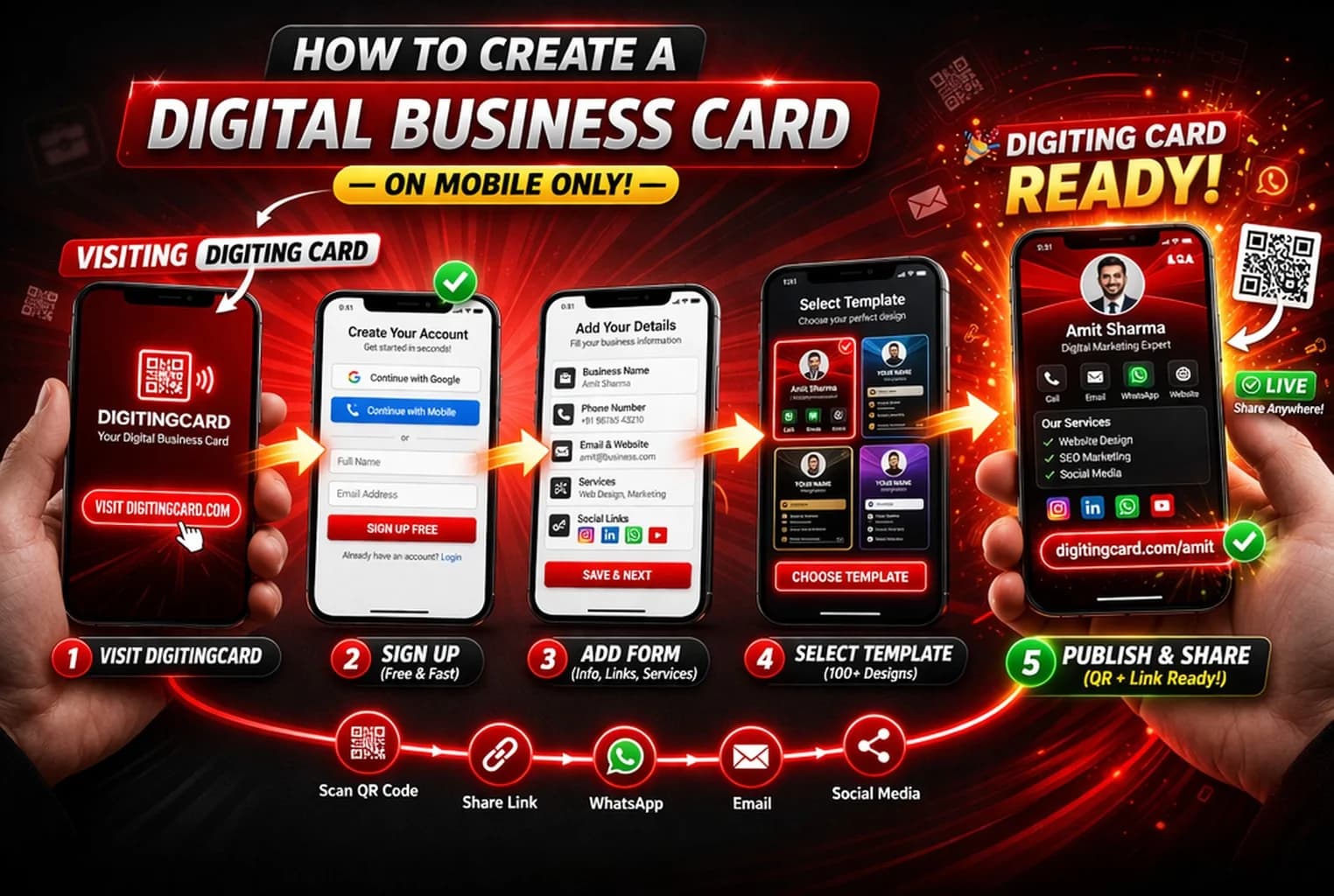
Quick answer
A digital business card is a mobile-friendly online card that shows your contact details, business information, and useful links in one place. You can share it through WhatsApp, QR code, or a direct link.
What is a digital business card?
A digital business card is a modern business card that lives online instead of on paper. It usually includes your name, phone number, business name, email, website, social links, address, and any other important details you want customers to see.
You may also hear it called an online visiting card or digital business card. The idea is the same: make it easier for people to contact you, save your details, and understand your work without typing anything manually.
In practical terms, it works like a simple profile page for your business identity. When someone opens it, they can call you, message you, open your map location, visit your social media pages, or save your contact in just a few taps.
- Share your contact details through WhatsApp, QR code, or one simple link
- Update your card anytime without reprinting
- Help customers call, save, or message you in one tap
- Keeps business details together instead of sending them one by one
How does a digital business card work?
The process is simple. First, you create your card online and add your details. After that, you get a shareable link and QR code. Whenever you meet a customer or receive a new inquiry, you can share that link directly.
When the other person opens your link, your digital visiting card appears on their phone. Instead of reading a printed card and typing your number manually, they can take action immediately.
- You create your card and add your contact details
- You receive a shareable link and QR code
- You send that link on WhatsApp, SMS, email, or social media
- The customer opens your card on their phone
- They can use the contact and business actions you chose to publish
Want the step-by-step setup process?
Read our practical guide on how to create a digital business card and start with a design that is easy to use on mobile.
What details should a digital business card include?
The best digital business cards are simple and useful. They do not try to show everything. They focus on the details that help the other person contact you quickly and understand what you do.
- Your name and profile photo
- Phone number and WhatsApp contact
- Business name and short description
- Email address and website or portfolio
- Map location or business address
- Social media links
- Products, services, or key offers
If you are just starting, keep it simple. Your name, phone number, business name, WhatsApp button, and one short line about what you do are usually enough. You can always improve the card later.
Digital vs printed: what changes?
Printed cards are still familiar, but they have clear limits. Once printed, they cannot be updated. If your number changes, your role changes, or your offer changes, the old card becomes outdated immediately.
A digital profile handles that situation differently: when the same public URL remains in use, you can update the information shown at that destination. A printed card still has value when the physical handoff itself matters.
- No printing cost every time your details change
- Easy sharing in WhatsApp chats, statuses, and social profiles
- One place for your phone number, business info, and links
- Designed to be opened from a phone or browser
- Useful for both online and offline networking
If you want a deeper comparison, read our article on digital business card vs printed visiting card.
Who should use a digital business card?
A digital business card is useful for almost anyone who shares their phone number or business details often. It is especially helpful when most of your customer conversations happen on mobile.
- Shop owners who reply to customers on WhatsApp every day
- Freelancers who want one clean page for contact details and portfolio links
- Real estate and insurance agents who need a fast follow-up tool
- Consultants, coaches, and trainers who want to look more professional
- Small business teams who want a smarter replacement for printed cards
Even if you still use printed cards offline, a digital card can improve the way people follow up with you after the first meeting.
When WhatsApp is part of your customer workflow
If customers already ask you for prices, locations, timings, services, or follow-up details on WhatsApp, a digital business card can give you one reusable profile to send instead of assembling those details again for every conversation.
Instead of sending your number, business name, address, and social links one by one, you send one clean card. It feels keeps the information together and gives the customer clear actions when they are ready to continue.
This can be useful for local businesses and service providers that use WhatsApp as one of their regular customer-contact channels. The value comes from the workflow, not the city tier.
Common mistakes people make with digital business cards
- Adding too much information on the first screen
- Using a card that is hard to read on mobile
- Forgetting to include a clear WhatsApp or call action
- Leaving old phone numbers or broken links on the card
- Treating the card like a design item instead of a contact tool
The best card is usually the one that is easiest to understand and easiest to act on. Design matters, but clarity matters more.
Final recommendation
If you repeatedly share a phone number, WhatsApp, location, services, or business links, a digital profile can reduce the number of separate messages you send. Keep using printed cards when a physical handoff helps, and add a QR code when you want that print to lead to an editable online profile.
Frequently asked questions
What is a digital business card in simple words?
A digital business card is an online card that contains your contact details, business information, and useful links in one place. You can share it through WhatsApp, QR code, or a direct link instead of handing out a printed card.
Is a digital business card free to create?
Yes, many platforms offer a free way to create a digital business card. On Digiting Card, you can start free and upgrade later only if you need extra business features.
Can I update my digital business card later?
Yes. One of the biggest benefits of a digital business card is that you can update your phone number, business details, links, and profile anytime without reprinting anything.
Who should use a digital business card?
A digital business card is most useful when you regularly share business details and the recipient needs more than a phone number—for example, WhatsApp, location, services, portfolio links, documents, or enquiry actions.
Is a digital business card better than a printed card?
Neither format is always better. Printed cards are useful for physical handoffs; digital cards are useful for clickable actions, updates after sharing, and online follow-up. Many businesses use a printed card with a QR code that opens the digital profile.
Create your free digital business card
Start with a simple design, add your details, and share your card on WhatsApp, QR code, or direct link. If you want to see design options first, browse our styles and then create your card when you are ready.