Before you create and manage a digital business card, you need a Digiting Card account. Your account saves your card, lets you update details later, and gives you access to dashboard tools.
This guide explains how to create your account, verify your email, and move from signup to your first digital card without confusion.
Quick answer
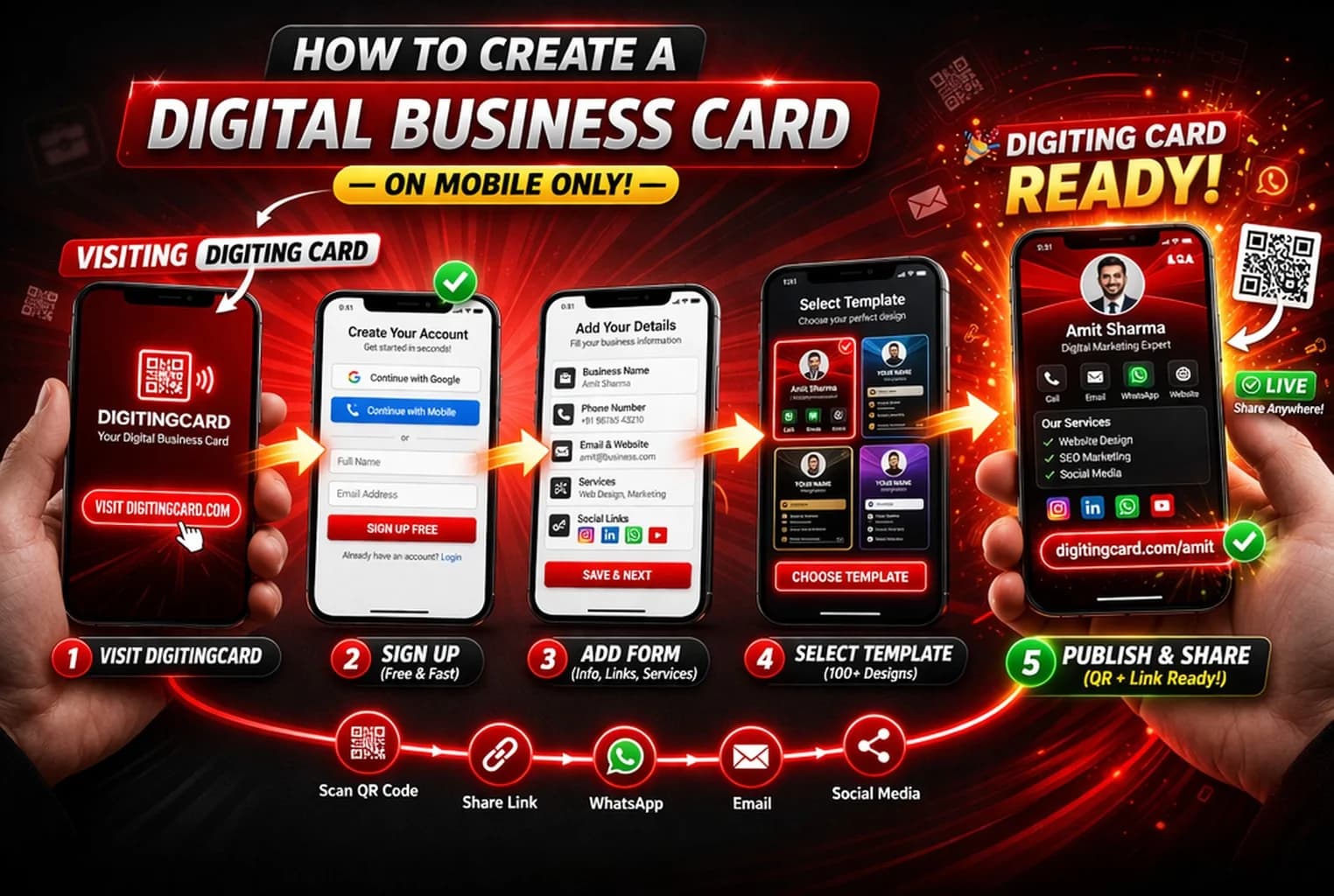
To create a Digiting Card account, open the signup page, enter your account details, verify your email if required, login to your dashboard, and start creating your first digital visiting card.
Why create an account before building your card?
A digital business card is not just a one-time design. You may need to update your phone number, WhatsApp, services, links, or business details later. An account keeps everything saved and editable from one dashboard.
- Save and manage your card
- Update your details anytime
- Access dashboard tools
- Manage business listing options
- Keep your card connected to your account
How to create an account on Digiting Card
1. Open the signup page
Go to the Digiting Card signup page and start with your account details. Use an email address that you can access because verification may be required.
2. Enter your basic account details
Add your name, email, mobile number if requested, and password. Keep the information accurate because it helps with account access and support.
3. Verify your email
After signup, complete email verification if it appears. This keeps your account secure and helps confirm that the card belongs to you.
4. Open your dashboard
After verification or login, open your dashboard. This is where you can create your digital business card, manage listings, and update your profile.
5. Create your first digital business card
Add your name, business details, WhatsApp, contact buttons, location, and useful links. Start simple and improve the card later.
Tips before creating your account
Keep your basic details ready before signup. This makes the account and first card setup faster.
- Use your active email address
- Create a password you can remember
- Keep your business name and contact details ready
- Complete email verification before creating the card
- Start with one simple card instead of adding too much at once
Mistakes to avoid
- Using an email you cannot access
- Skipping verification and then losing access later
- Adding wrong mobile or WhatsApp details
- Creating a card before deciding the main contact action
- Adding too many links before the card is useful
Final recommendation
Create your account first, then build one simple digital visiting card with your main contact details. After your card is live, you can improve it with more links, business sections, QR code sharing, and WhatsApp follow-ups.
Frequently asked questions
Is it free to create a Digiting Card account?
You can start by creating an account and building your digital business card. Advanced features may depend on the platform plan, but account creation should be the first step.
Do I need an account before creating a digital business card?
Yes. Creating an account helps you save your card, update it later, and manage your profile from the dashboard.
What details do I need for signup?
You usually need your name, email address, password, and sometimes mobile number. After that, you can add business details while creating your card.
Can I edit my card after creating an account?
Yes. After creating your account, you can update your digital business card from the dashboard whenever your details change.
Create your Digiting Card account
Sign up, verify your email, and start building your first digital business card from the dashboard.